Recovery housing

Bring clarity to the daily work of recovery housing.

Keep admissions, resident records, drug and alcohol testing, attendance, and balances organized in one place—so your team can see what needs attention and keep daily work moving.

The recording is 2:07, with English captions. It does not open a live organization.

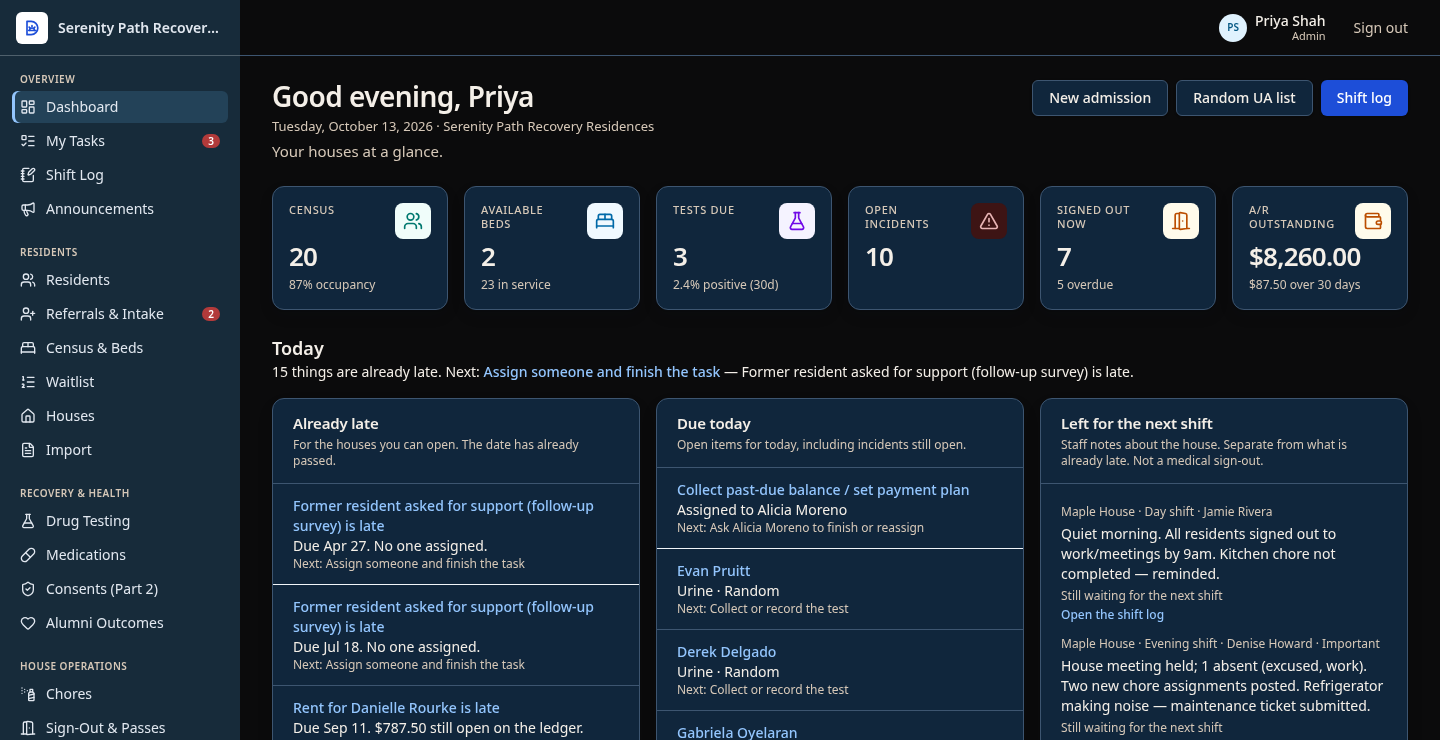
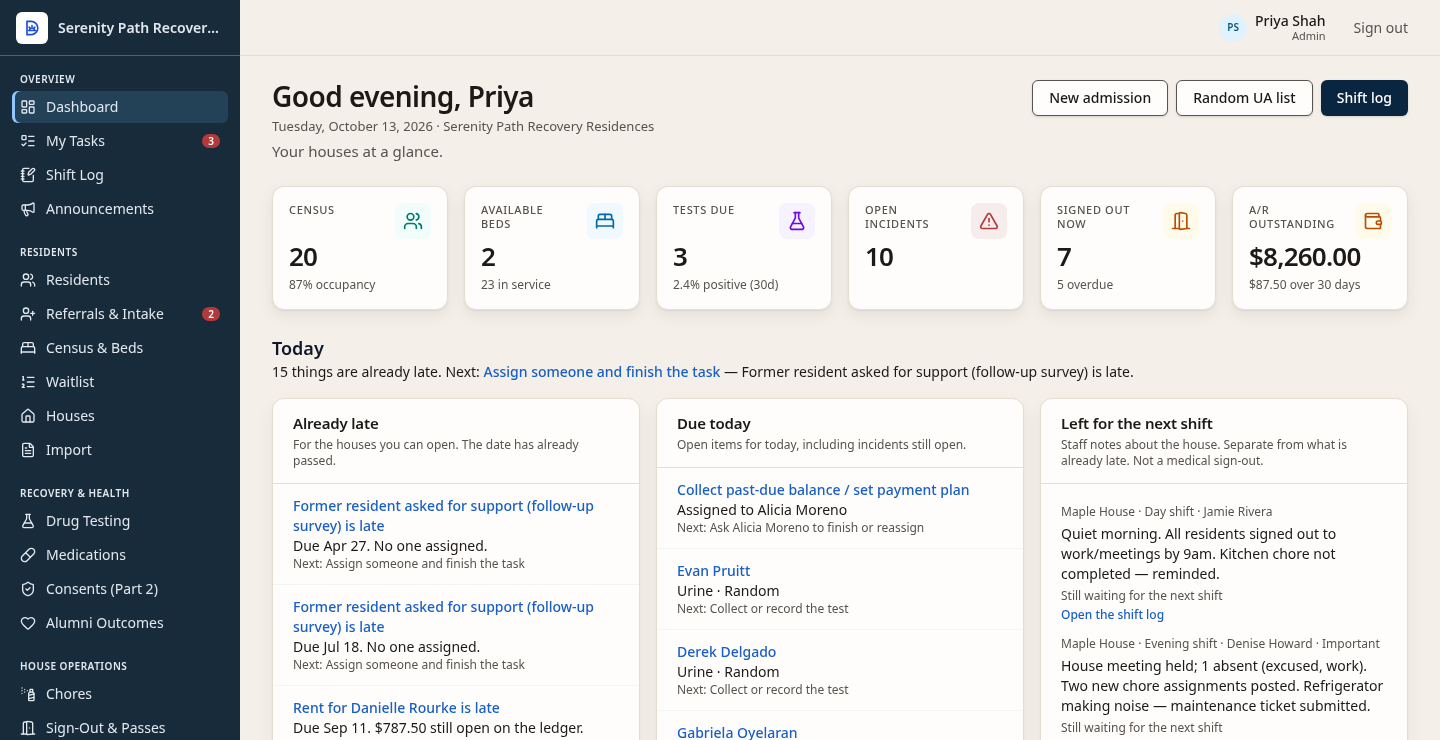
Dashboard for fictional Serenity Path Recovery Residences, signed in as sample staff Priya Shah. Census, tests due, and balances are sample figures.

The dashboard image did not load.

This note is not a substitute picture of the product.

Screens shown use fictional demo data.

Product preview

See Dorian in action.

Fictional Serenity Path dashboard for sample staff Priya Shah, with census, open beds, tests due, and accounts receivable.

A morning view of the houses.

Census, tests due, and balances sit on one dashboard so the day starts from the same picture.

Screens shown use fictional demo data.

Daily work

From admission to everyday operations.

01

Keep admissions and resident records connected.

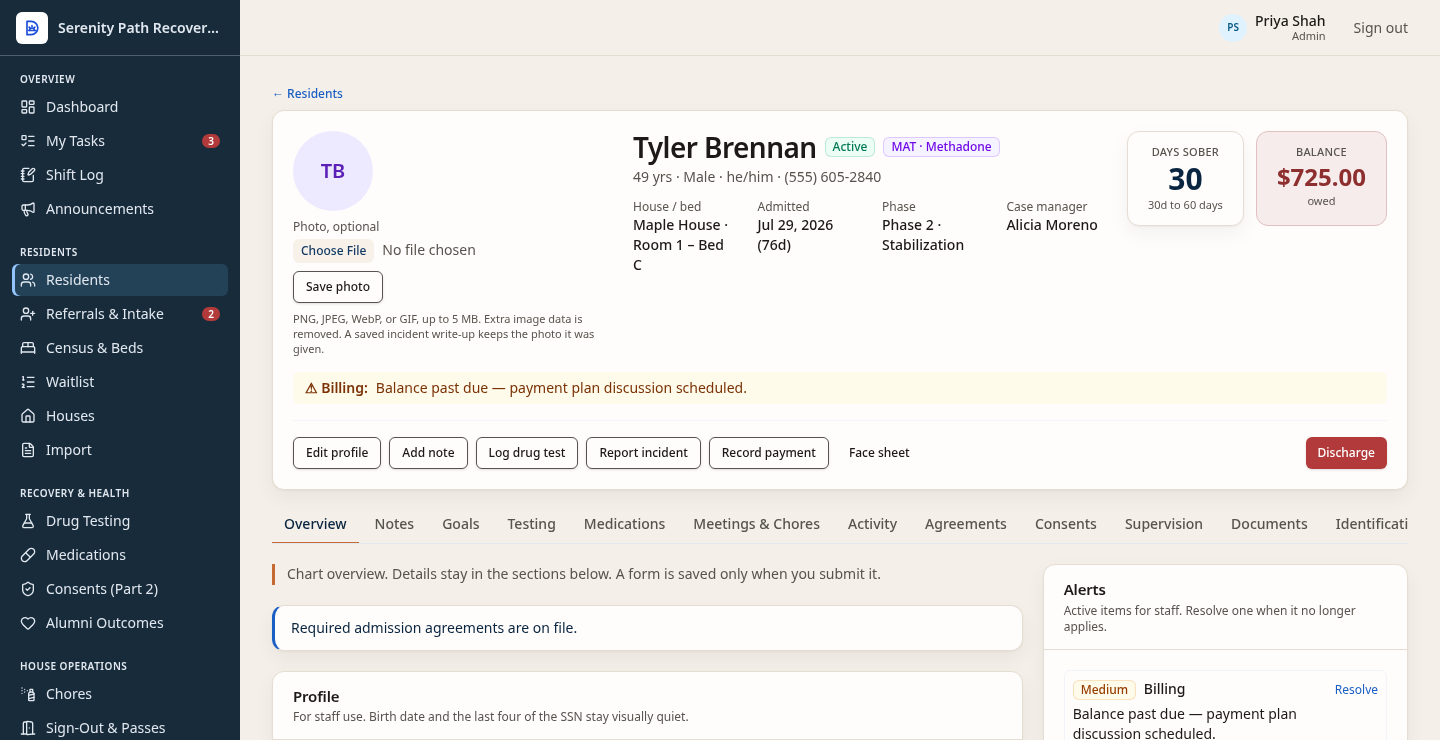
Referrals and intake lead into the resident record: who is in which house and bed, and the chart staff open for that stay. Resident goals and case notes are house notes for that stay. They are not a clinical treatment plan or an encounter system.

Fictional resident chart for Tyler Brennan, showing house, bed, admission, and balance.
Fictional resident chart · Serenity Path sample house
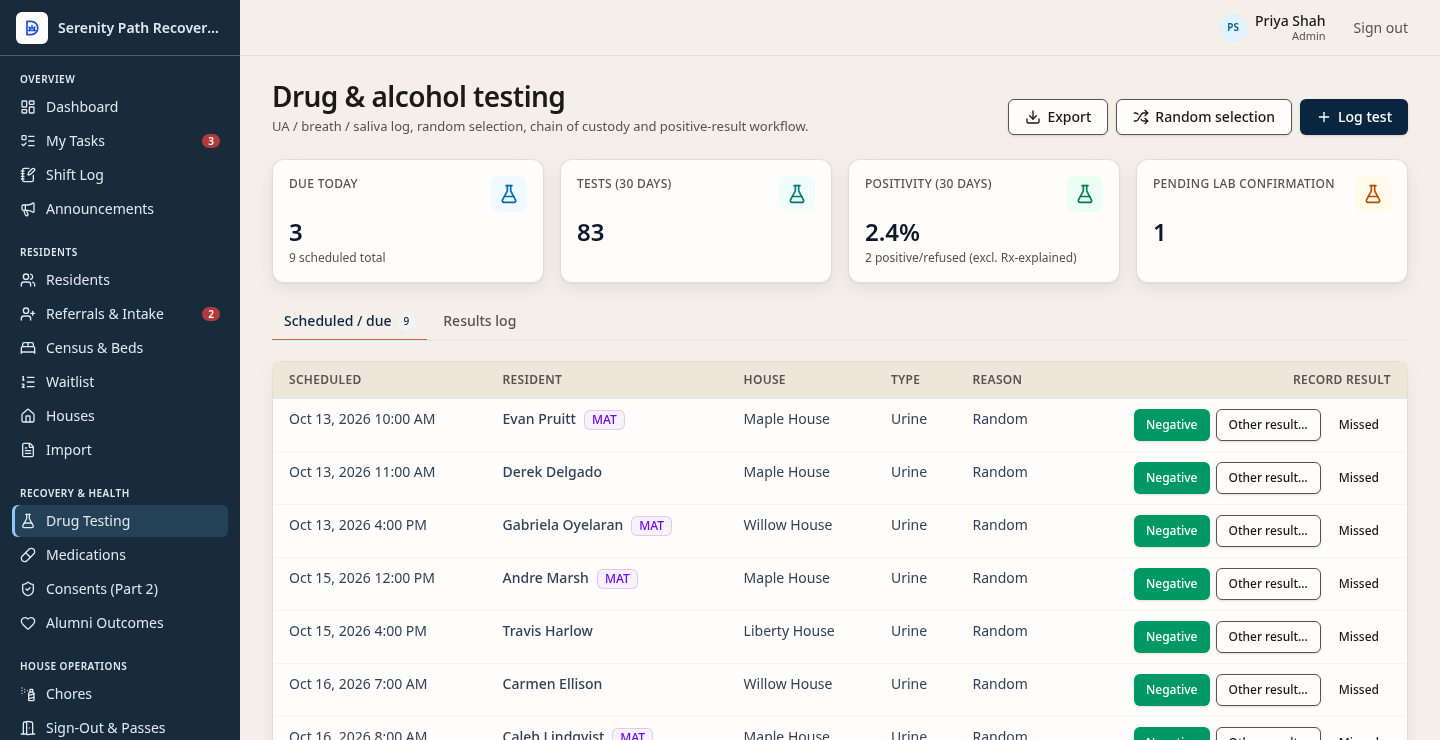
Drug and alcohol testing schedule for fictional Serenity Path. This picture is the testing schedule, not an attendance screen.
Fictional testing schedule · Serenity Path sample house

02

Coordinate testing, attendance, and house responsibilities.

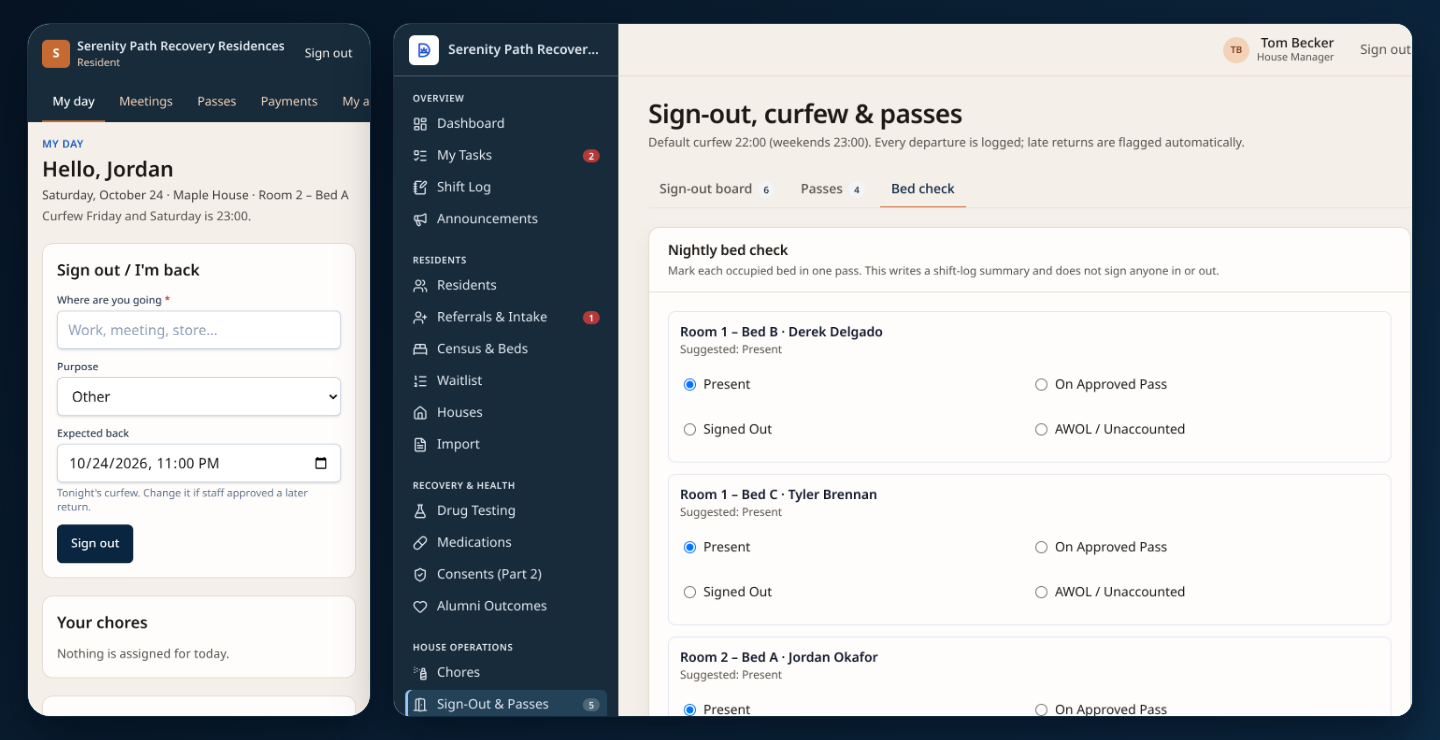
Staff keep the testing schedule and log results. They also record outside meetings, house meetings, and chores with the resident.

This picture is the testing schedule. Attendance is not shown here. The testing list is not a live lab feed.

03

Understand payments and outstanding balances.

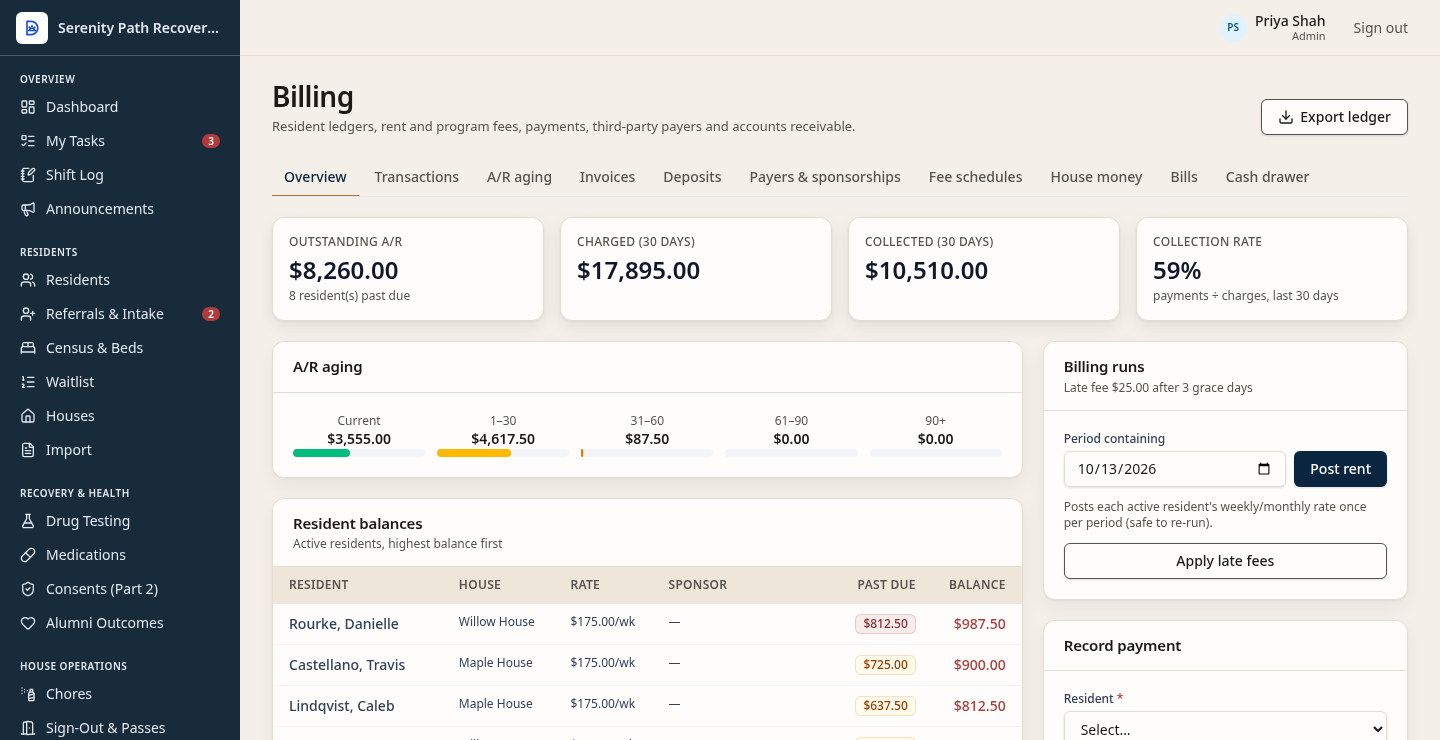
When staff take cash, a money order, or a similar receipt, they record it against the resident balance. The billing view shows what is still outstanding.

This is not card processing. Dorian does not send automated payment reminders.

Fictional billing view of resident balances. Receipts are recorded by staff. Not card processing.
Fictional resident ledger · Serenity Path sample house

Pricing

Per licensed bed. A monthly minimum. No staff seats.

$6.99per licensed bed each month, for 1–49 beds.
$129organization minimum. If beds times the rate is under $129, the month is $129.
$5.99per licensed bed at 50–99 beds. Fifty beds is $299.50, so the minimum does not change it.
100+custom. Published per-bed rates stop at 99 licensed beds.

What a licensed bed is

A licensed bed is any bed that is not marked out of service, whether or not someone is in it. An empty in-service bed counts. A bed marked out of service does not.

Twelve beds times $6.99 is $83.88, so the $129 minimum applies. Twenty-four beds times $6.99 is $167.76, so the minimum does not change that month. Full pricing and the bed calculator

Other amounts

  • Annual billing is two months free: pay 10 times the monthly price, including when the monthly price is the $129 minimum.
  • 14-day trial. No per-staff fees. Self-serve setup is $0.
  • Optional onboarding is listed at $249. It is not required, and this website does not charge it.
  • Organization-specific development is a separate paid build. A price for that work is not published here.

Setup

Settings you can change, and work that is scoped separately.

Already in the product

An organization can set these without a custom build:

  • Organization name, phone, email, time zone, and mailing address.
  • Display name, brand color, and logo.
  • Weeknight curfew, weekend curfew, and required outside meetings per week.
  • Target tests per resident per month, and the random-selection percent.
  • Late-fee amount, grace days, idle session timeout, and whether staff must use a second factor.
  • House rules text, inserted into agreement templates. A signed agreement keeps the text the resident signed.

Example program profiles can apply five of those fields after someone reviews them: weeknight curfew, weekend curfew, required meetings per week, tests per month, and random-selection percent. Applying a profile does not change billing, security, house rules, or a curfew a house has set for itself.

A separate build

Paying organizations can ask Dorian Recovery to build something their program needs. That work is scoped and agreed for that customer.

Included configuration is the settings list on the left. Optional onboarding, listed at $249, is help using those settings. It is display-only on this website and is not charged here. Custom development is a separate scoped build for that customer. It is not a self-serve form builder, and it is not unlimited customization from a settings screen. This page does not promise a date, an integration, or a feature that is not already in the product.

Founder

Healthcare IT experience. Recovery housing experience. One practical perspective.

Daniel Natter, Founder of Dorian Recovery

Daniel Natter

Author of the software and owner of Dorian Recovery.

Healthcare IT (HCA Healthcare, Cerner/Oracle) & recovery residence operations

Dorian Recovery grew out of Daniel Natter's experience in healthcare technology and the daily work of recovery housing.

At HCA Healthcare and Cerner/Oracle, Daniel worked with the systems healthcare teams depend on. In recovery housing, he handles intakes, documentation, testing coordination, meetings, and staff communication—work that gives him a firsthand understanding of what staff need throughout the day.

Dorian brings those experiences together: an understanding of how information should move through a system, and why it matters to the people using it. That perspective shapes everything from the morning dashboard to resident records, shift handoffs, and alumni follow-up.

Questions

Pricing, setup, records, and support.

These are the facts this site can stand behind. The recording is the next section. It does not change these terms.

Which programs is this for?

Sober living is the clearest current offer. Treatment centers can use it for residential operations alongside the clinical EHR they already have. It does not replace that EHR. Veteran housing can record program and funding notes. Dorian does not file VA claims, decide VA eligibility, administer grants, or submit to HMIS. A fuller clinical record is a later ambition, not this product.

What does it cost?

$6.99 per licensed bed each month, with a $129 organization minimum. $5.99 per bed at 50–99 beds. Custom at 100 or more. Annual billing is two months free. There is no per-staff fee. Details are in the pricing summary and on the pricing page.

How does setup work?

Self-serve setup is $0. You create the organization and a password, then enter houses, beds, curfews, meeting and testing targets, fees, and house rules in Settings. The trial is 14 days. Optional onboarding is listed at $249. It is help using those settings, it is not required, and this website does not charge it. This page does not promise how many hours that takes.

Can existing records be moved in?

Yes, with a guided spreadsheet (CSV) import. Download a CSV template, fill it in, and upload it: houses and beds first, then residents, then case notes and medications. Documents and photos come in as a ZIP file with a manifest. Nothing is saved until you review a preview and click Import. Lockbox counts and dose history are not imported. Reports already in Dorian can be downloaded as CSV.

What support is included?

This site does not publish support hours, a response time, or a service agreement. The inquiry page emails a note to Daniel. It is not a support contract. To reach Daniel directly, email daniel.natter@dorianrecovery.com or call 816-466-0225.

How does staff access work?

There is no per-staff fee. Roles in the product are owner, admin, house manager, case manager, and staff. House managers and staff are limited to the houses they are assigned. Residents use a separate portal and do not get the staff record.

Next step

See how Dorian could fit your program.

Watch the recorded demo here. It does not require a sales call, and it does not open a live sign-in.

The inquiry page emails a short note to Daniel, who replies to the address you give. Leave out health information.

Watch the demo

2:07, with English captions. Fictional Serenity Path demo data. This does not open a live organization or sign-in screen. The recording stays paused until you press play.

Ask Daniel a question / request a walkthroughEstimate your bed priceOpen the demo page

Screenshot

Screens shown use fictional demo data.